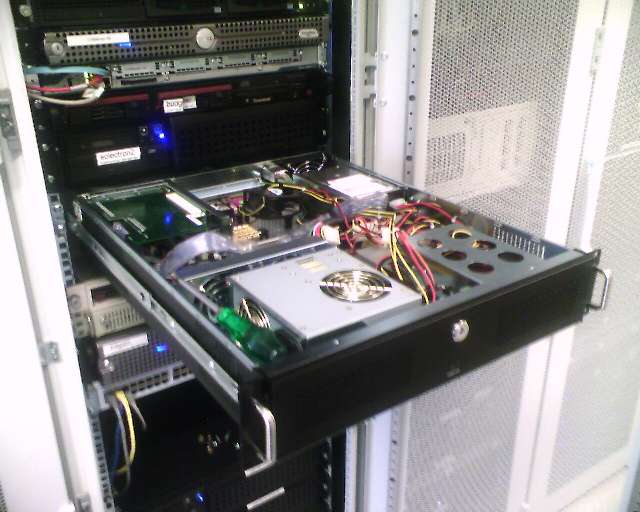
Servers
All of our servers are hosted of our shared dedicated server. This server is homebuild to save us money. It set us back about 650 euros in total. The costs where split between us and TheKOSs2, so we spend about 325 euros on serverparts. It has the following specifications:
- CPU: Intel Core 2 Quad Q6700
- Motherboard: Gigabyte GA-965GM-S2
- Memory: 6GB's of DDR2 ram
- O/S: Windows XP Pro x64
- SCSI controller: Adaptec SCSI card 29160N
- SCSI Harddisks: 2x IBM 18.4 GB 10k RPM (in software RAID 0)
- IDE Harddisk: 120 GB Seagate (Windows disk + backup for RAID)
- IDE Harddisk: 400 GB western digital (Data + website disk)
General services
Webserver
Our server is used to host this website, and the websites of the people that donate. Not much to say about this, simply because you're already on it ;)
IRC server
We have two IRC servers running. We use this server for communicating with each other in a groupchat manner. It's a great way to learn to know some people that are active in the clan. It also allows you to see what is happening in both the Renegade as the Unreal Tournament server. Our primary IRC server is irc.blackintel.org where we usually reside in the following channels: #blackintel, #bi-clan, #blackintel1, #bi-ut3, #bi-fs. Note that our IRC server is linked to the n00bstories IRC server. Therefore you can also join #BlackIntel from n00bstories and you will end up in the same channel.
Connecting to the IRC Server
The following should get you started if you are new to IRC. You will need to download X-Chat (or another client) to connect. The following details assume you have downloaded, installed and started X-Chat already.
Click the Add, tab replace the text "New Network" with "BlackIntel" (You can use anything but this would be a logical name). Then click the edit tab with "BlackIntel" still selected. A box will come up, it contains amongst other stuff the text "newserver/6667". Edit it so it says "irc.blackintel.org/6667". Next to "Channels to join" type "#blackintel,#bi-clan,#bi-tk2,#bi-ut3,#bi-fs" (With the #, without the "). This will make sure you join our channel after connecting to the IRC server.
That is enough to connect to IRC. You probably want to enable "Auto connect to this network at startup" to, well, join us every time you start X-Chat. You can now close that window. You will still have the server window open (if you don't, press ctrl+s), you probably want to enable "Skip network list on startup" to hide that window when you start X-Chat.
Now the only thing you will have to do is, with BlackIntel selected, press "Connect". You should end up in our channel. :) If you don't, or just don't understand what to do, leave a message on the forums or contact someone and we will probably be able to help you out.
Ventrilo 2.3.1
We have a ventrilo server set up for players to talk to each other while playing. It is mostly used by the C&C Renegade clan, but other players are welcome to join as well. This is currently the most used version, because we created an interface for it with our C&C Renegade server. Therefor this version is recommended.The BlackIntel Ventrilo 2.3.1 server address is ventrilo.blackintel.org. It uses the default port, 3784.
You can get our version of Ventrilo HERE.
If you have Ventrilo and a Nickname setup, click here to connect.
We've created a Ventrilo guide to help you along if you run into problems. You can find it here
Ventrilo 3
This is the newer Ventrilo server and is hosted on a different machine. It is used primarily by the First Strike playing part of the clan. The BlackIntel Ventrilo 3 server address is ventrilo3.blackintel.org. It uses port 28384.
If you have Ventrilo 3 and a Nickname setup, click here to connect
We've created a Ventrilo guide to help you along if you run into problems. You can find it here